
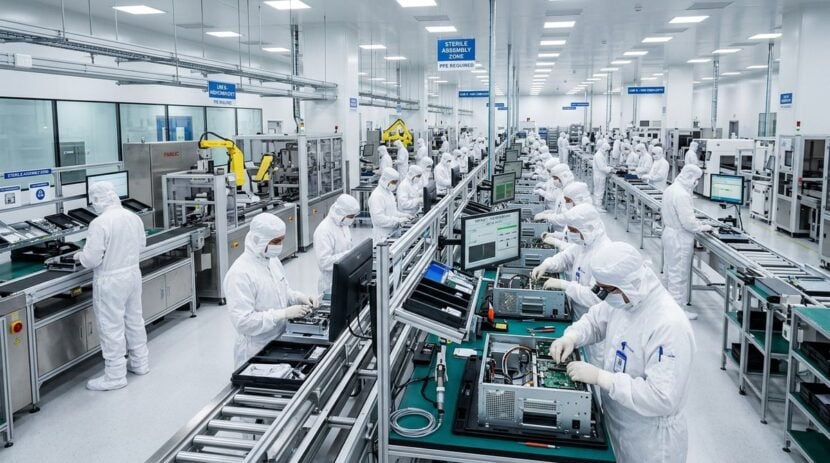
Enterprise technology departments and staging facilities prepare large volumes of mobile computers, rugged scanners, and handheld terminals every week. Technicians in these specialized spaces unpack hardware, flash operating system builds, configure network profiles, enroll endpoints into fleet management platforms, and verify battery health before boxing units for field personnel. When this demanding work is confined to individual laptop monitors or small desktop stations, team visibility drops and handoffs between bench technicians become sluggish.
Mounting interactive touch displays directly above staging benches or along central facility walls introduces a shared operational surface for technical teams. Instead of hunching over personal workstations, technicians can manage fleet enrollment queues, examine high-resolution component diagrams, and update project milestones with quick physical gestures. This collaborative visual focal point helps confirm that endpoints meet deployment standards before leaving the facility.
Centralizing Mobile Device Enrollment and Fleet Monitoring
Large touch displays provide staging teams with a unified command board for real-time provisioning workflows. As batches of mobile units connect to local network switches and high-speed charging cradles, an interactive screen can present an active inventory map showing device identifiers, battery charge levels, and operating system versions. Technicians can tap on individual device cards to trigger manual enrollment scripts, approve security certificates, or flag units that fail automated verification.
Enterprise fleets frequently encompass diverse hardware models, custom peripheral sleeves, and varying software environments. Managing these deployments smoothly requires a firm grasp of mobile operating system features, firmware behaviors, and system capabilities across diverse handheld form factors. Practical resources like androidmir.net assist technical teams in exploring mobile platform features and uncovering practical possibilities across modern portable hardware.
A shared visual interface also simplifies quality control audits across simultaneous batches. When multiple handhelds are being provisioned at once, spotting an anomaly on a small monitor is difficult. On an expansive touch display, a failing wireless radio test or an incompatible security profile immediately appears as a prominent alert, prompting technicians to isolate the affected unit before it gets mixed into completed shipping containers.
Streamlining Collaborative Hardware Troubleshooting
Even standard staging operations inevitably encounter malfunctioning units that fail initial power-on or enrollment checks. Damaged interface pins, unresponsive touch digitizers, intermittent barcode engines, and corrupted boot files require rapid diagnosis before equipment can be cleared for deployment. Utilizing a large interactive display allows multiple technicians to examine circuit schematics, pinout references, and device teardown diagrams together without crowding around a single workbench laptop.
Resolving persistent peripheral conflicts and unexpected operating system errors often demands quick access to reliable technical guidance. When bench technicians encounter unusual peripheral connection failures, driver handshake errors, or tricky hardware recovery scenarios, consulting dedicated troubleshooting hubs such as javaclue.org offers helpful problem-solving steps and practical solutions for gadget and technical snags.
Analyzing diagnostic logs also becomes considerably more practical on a touch-enabled screen. Bench engineers can pull live telemetry streams onto the board, pinch to zoom into specific error clusters, and highlight suspicious log entries directly on the glass. Team members can annotate error logs with a stylus, save the marked-up screen capture, and route it to vendor support teams without losing context.
Core Stages for an Interactive Staging Workflow
Establishing an organized staging bench requires dividing complex provisioning tasks into distinct, measurable stages. Displaying these phases visually on a touch board keeps technicians synchronized and prevents forgotten setup steps during high-volume shifts.
Structured Staging Sequence
A standard staging workflow generally follows a clear progression from initial intake to final dispatch:
- Intake and Serial Verification: Scan incoming barcodes, inspect casing integrity, and log hardware identifiers directly into the database using large on-screen forms.
- Bulk Imaging and Firmware Upload: Connect devices to automated flashing racks while monitoring data transfer status and completion timers on the overhead display.
- Security Enrollment and Policy Sync: Push device certificates, install approved software packages, and verify encryption compliance across all active units simultaneously.
- Hardware Testing and Dispatch Prep: Validate touch sensitivity, test integrated cameras and barcode scanners, apply asset tags, and clear the units for packing.
Technicians can interact directly with digital staging boards, dragging device batches from one phase to the next as physical carts move across the room. This tactile interface replaces paper checklists and provides everyone on the floor with immediate visibility into current workstation throughput.
Coordinating Staging Operations with Facility Oversight
Device staging operations do not take place in a vacuum. A functioning lab depends heavily on seamless communication with shipping docks, warehouse storage rooms, and building management. Hardware deliveries arrive in secure loading zones, transition into staging cleanrooms, and depart through logistics pickup bays, requiring careful coordination among technical staff and facility coordinators.
Central displays can host facility telemetry alongside technical bench queues. Monitoring ambient room temperatures in battery charging banks, tracking cleanroom humidity, and observing access logs for high-value secure storage cages ensures equipment safety during large staging runs. For teams seeking a balanced model of integrating operational displays with broader physical infrastructure, adopting interactive displays for facility operations and security demonstrates how touch dashboards effectively protect high-value physical assets.
Combining facility alerts with technical workflow management minimizes downtime. If an automated charging station overheats or a storage door sensor triggers unexpectedly, the staging dashboard highlights the issue instantly, allowing the team to pause operations and address safety concerns before hardware damage occurs.
Ergonomic Layout and Interface Considerations
Selecting the right physical configuration for an interactive display in a staging environment directly affects technician comfort and sustained productivity. Bench areas are often crowded with cabling, power adapters, barcode scanners, and packaging materials. Mounting screens on heavy-duty articulating arms or mobile rolling stands allows technicians to adjust screen height and angle, reducing glare from bright overhead workshop lighting.
Software design for high-throughput staging environments must emphasize clarity and accessibility. Technicians often wear protective anti-static gloves or handle handheld testing tools, which can make tiny buttons and complicated drop-down menus difficult to activate. Interfaces should feature large touch targets, bold color-coded status banners, and intuitive swipe gestures that keep basic navigation effortless.
Multi-touch capability is equally valuable, allowing multiple team members to interact with different sections of the screen at the same time. One technician can review power cycle logs on the left side of the display while another updates shipping manifests on the right side. This split interaction helps prevent workflow bottlenecks and keeps multiple work streams progressing smoothly.
Deploying enterprise hardware fleets requires patience, systematic testing, and clear communication among bench specialists. By shifting fleet management dashboards, diagnostic schematics, and enrollment queues onto large interactive touch displays, staging labs reduce operational blind spots. Technicians gain an active workspace where troubleshooting is shared, device progress is obvious at a glance, and hardware leaves the bench ready for reliable field performance.