
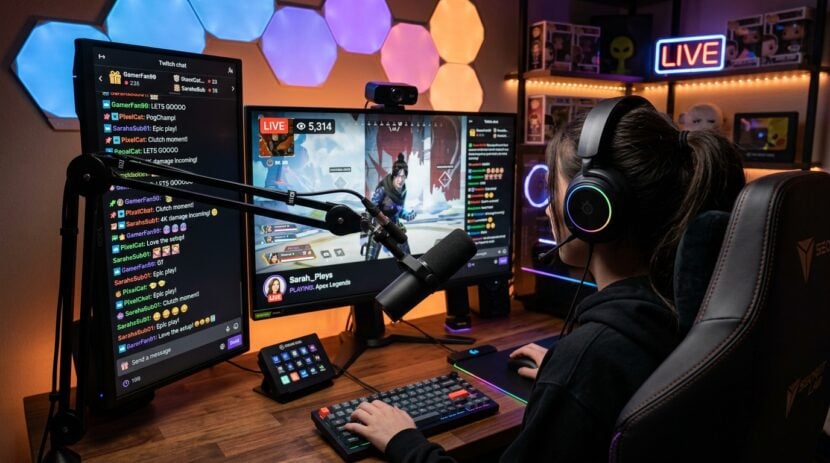
Creating video and digital media requires balancing many moving pieces at once. Studio spaces often become crowded with secondary monitors, paper notes, storyboards, and production gear. As creator workflows expand to include live broadcasts, regular video series, and multi-channel campaigns, keeping production tasks organized becomes a constant challenge. Interactive touch displays offer a modern solution by turning blank walls, studio tables, and movable boards into responsive digital workspaces that streamline daily studio routines.
Instead of toggling between small computer screens and physical notebooks, creators can use interactive surfaces to interact directly with their media assets. Large touchscreens create a central hub where visuals, recording scripts, audio levels, and publishing schedules meet. By merging tactile control with software tools, content teams and independent creators can focus more on production quality and less on managing workspace clutter.
Streamlining Pre-Production and Visual Storyboarding
Pre-production sets the foundation for every successful video shoot or media campaign. Traditional storyboarding often relies on loose sticky notes, static whiteboards, or digital tablets passed around a conference table. When multiple team members need to review camera angles, sketch scene transitions, or reorder segments, physical paper quickly becomes messy and hard to archive.
An interactive display allows creators to draw, annotate, and rearrange scene mockups directly on a large surface. You can pull high-resolution images onto the screen, draw lighting arrows with a digital stylus or your fingertip, and save the entire arrangement as a project file for the shooting crew. This visual clarity eliminates confusion before recording even starts.
Just as specialized organizations use interactive setups in wellness clinics to coordinate appointments and visual charts, digital studios rely on large touch surfaces to organize production calendars and asset libraries in one accessible location. Having your entire visual timeline visible to everyone in the room keeps creative sessions focused and helps every participant understand the day’s goals.
Enhancing Camera Alignment and Live Studio Control
During a live studio session, keeping an eye on your camera frame, teleprompter text, and lighting conditions can easily overwhelm a solo host or small production crew. Standard camera monitors provide a clear view of your framing, but their small dimensions make it difficult to check fine details from across a room. A large interactive monitor positioned just off-camera provides immediate visual feedback without interrupting the flow of your recording.
Pairing a responsive touch screen with your main recording hardware allows you to preview scenes without crowding around a small camera monitor. When choosing recording devices for your studio desk or mobile vlog station, checking hardware comparisons on bestcameraworld.com helps ensure your selected body supports clean HDMI output and remote software control. Once connected, your touch display can serve as an expansive confidence monitor where you can tap to toggle scene overlays, check background focus, and monitor audio meters.
Touch interfaces also make on-the-fly adjustments much faster. If you need to jump to a different section of your speaking notes or trigger a digital graphic during a live stream, a quick tap on a wall-mounted panel keeps your hands free and your posture natural. This tactile convenience reduces technical distractions so you can deliver a more confident presentation.
Coordinating Editorial Calendars and Social Media Assets
Publishing regular content requires managing publishing calendars, visual assets, short video clips, and audience engagement across multiple platforms. When editorial schedules are tucked away inside private spreadsheets, team members can lose track of upcoming deadlines or misplace creative briefs. Projecting your editorial calendar onto an interactive screen turns project tracking into a shared, collaborative habit.
Brainstorming visual hooks, reviewing post layouts, and scheduling multi-channel releases become much smoother when team members can annotate drafts directly on screen. For creators refining their profile aesthetics and caption formulas, exploring resource hubs like InstaGTrends provides practical guidance on post timing and profile optimization. Bringing those insights onto an interactive display allows you to review draft thumbnails alongside promotional copy, ensuring your overall branding remains unified across every channel.
An interactive board also simplifies content repurposing. Long-form videos often yield several short snippets, quote graphics, and visual teasers. By opening video editing timelines and graphic templates on a large touch canvas, editors can scrub through footage, mark timestamp highlights, and assign specific clips to upcoming social media slots with simple drag-and-drop gestures.
Steps for Setting Up an Interactive Creator Workspace
Integrating touch surfaces into a recording environment does not require remodeling your entire facility. A thoughtful setup focuses on comfort, visibility, and simple connections to your existing production computers. Following a structured installation routine ensures your display enhances daily creative tasks without creating technical headaches.
- Mount the display at an ergonomic height that accommodates both sitting at a production desk and standing during video presentations.
- Position studio lighting fixtures to prevent harsh reflections or glare across the screen surface during active recording hours.
- Connect your primary media workstation using reliable video cables and configure touch drivers for quick, responsive gestures.
- Organize your screen desktop into dedicated zones for your production script, live video feed, and collaborative whiteboard software.
Taking time to adjust the angle and height of your screen prevents neck strain during long editing sessions. A mobile rolling cart offers even greater flexibility, allowing you to wheel the interactive board between your recording set, editing bay, and conference area as project needs change throughout the week.
Maintaining Studio Usability and Screen Longevity
A touch-enabled studio display functions best when treated as an integral piece of production gear. Because studio environments often involve bright lights, microphone stands, and multiple people touching the screen, establishing clean operating habits protects both the hardware and your digital workflow.
Regularly cleaning the glass surface with a gentle microfiber cloth removes fingerprints that can cause optical interference under studio spotlights. Keep cable paths organized behind mounting arms to avoid accidental disconnections when adjusting the display angle. It is also wise to archive completed project boards at the end of each production cycle to keep your active software interface clean and responsive.
Interactive displays bring clarity, hands-on control, and visual energy to modern content production studios. By replacing static boards and scattered sticky notes with dynamic touch interfaces, creators can streamline everything from scene framing to editorial scheduling. Investing in responsive interactive surfaces creates a flexible workspace that supports ongoing creative growth, collaborative brainstorming, and organized studio operations for years to come.